Cypress: assertions, hooks y organización de tests
should(), expect(), beforeEach(), context(). Validaciones post-login en Serenity.is. Tres errores reales: selector fantasma, input deshabilitado y viewport.
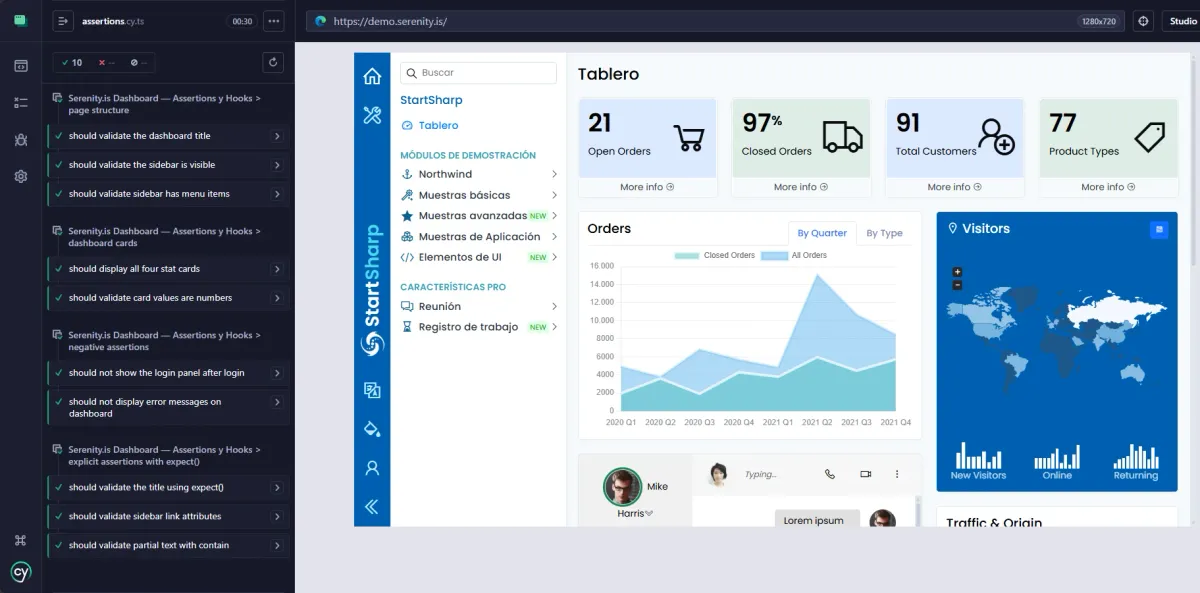
Contexto
El post anterior Cypress: selectores, comandos y login completo terminó con el login funcionando y 4 tests en login.cy.ts. El login estaba inline dentro de cada it() — repetido 4 veces.
Este post empieza con eso: eliminar la repetición con hooks, y después construir validaciones reales sobre el dashboard de Serenity.is.
beforeEach — el login repetido resuelto
En login.cy.ts cada test hacía su propio login:
it('should login with valid credentials', () => {
    cy.visit('/Account/Login')
    cy.get('#LoginPanel0_Username').clear().type('admin')
    cy.get('#LoginPanel0_Password').clear().type('serenity')
    cy.get('#LoginPanel0_LoginButton').click()
    cy.url().should('not.include', '/Account/Login')
})
Si tenés 10 tests que necesitan estar logueados, son 10 veces ese bloque copiado. En Selenium resolvía esto con @BeforeMethod de TestNG. En Playwright con test.beforeEach(). En Cypress es beforeEach():
beforeEach(() => {
    cy.visit('/Account/Login')
    cy.get('#LoginPanel0_Username').should('be.enabled').clear().type('admin')
    cy.get('#LoginPanel0_Password').should('be.enabled').clear().type('serenity')
    cy.get('#LoginPanel0_LoginButton').click()
    cy.url().should('not.include', '/Account/Login')
})
Ese bloque se ejecuta antes de cada it(). Los tests arrancan ya logueados.
El error con el input deshabilitado
El should('be.enabled') no estaba en la primera versión. Lo agregué después de que Cypress tirara este error:
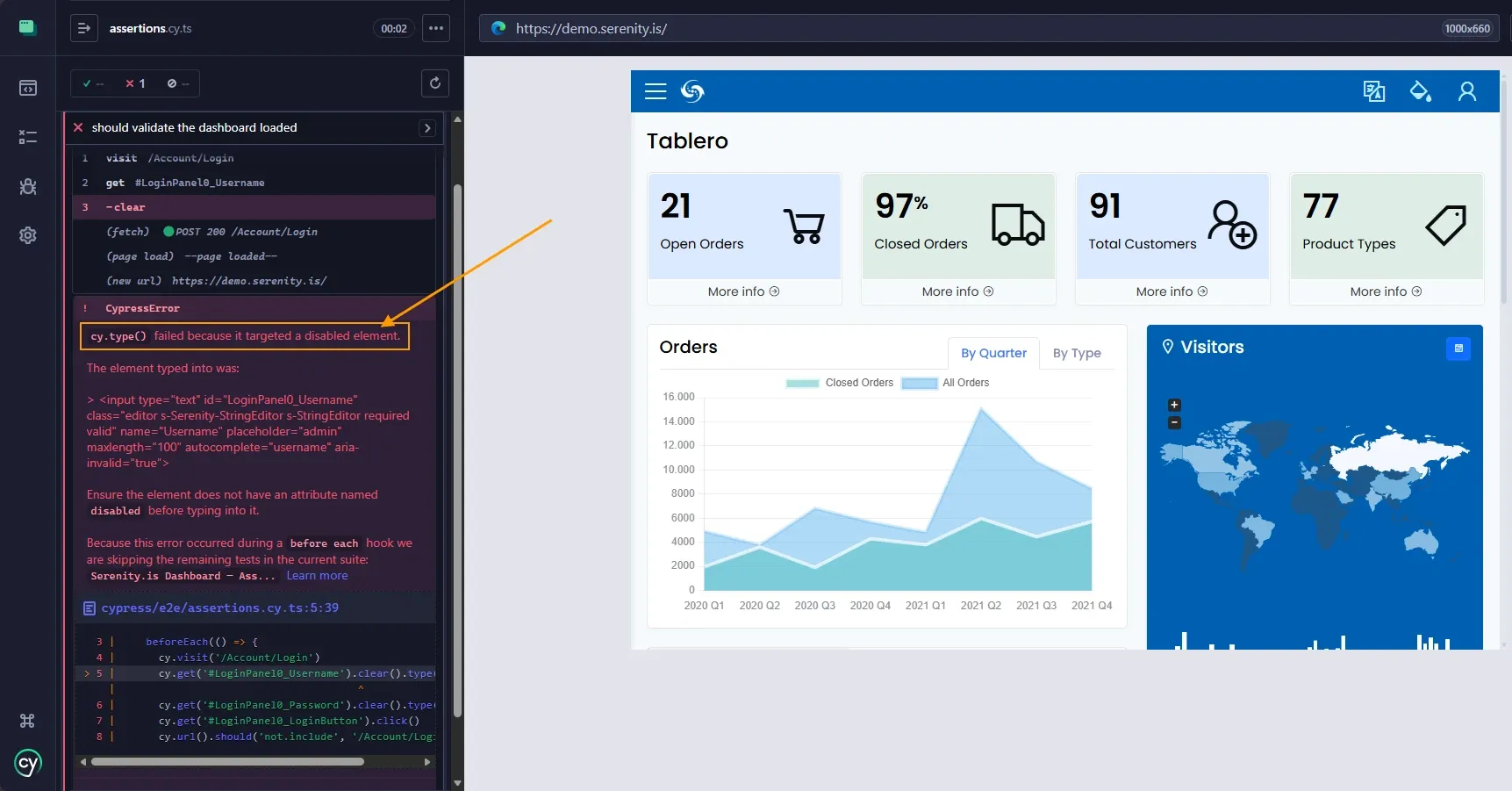
cy.type() falló porque el input estaba deshabilitado — Serenity.is tarda un instante en habilitar los campos después del page load
El mensaje fue claro: cy.type() failed because it targeted a disabled element. Serenity.is renderiza el formulario de login con los inputs deshabilitados por un instante y los habilita cuando termina de cargar.
En el Post Cypress: selectores, comandos y login completo contra Serenity.is no pasó porque el timing era distinto. Acá, con el viewport nuevo (1280x720) y el beforeEach corriendo antes de cada test, el issue apareció.
La solución: should('be.enabled') antes de clear().type(). Cypress espera hasta que el input esté habilitado y después escribe. Sin timeouts manuales, sin sleeps.
En Selenium hubiera necesitado un ExpectedConditions.elementToBeClickable() con WebDriverWait. En Cypress es una assertion encadenada.
Hooks disponibles
Cypress tiene 4 hooks:
before(() => {
    // se ejecuta UNA vez antes de todos los tests del describe/context
})

beforeEach(() => {
    // se ejecuta antes de CADA test
})

afterEach(() => {
    // se ejecuta después de CADA test
})

after(() => {
    // se ejecuta UNA vez después de todos los tests
})
Usé beforeEach porque cada test necesita su propio login. Si fuera algo que se configura una sola vez (crear datos de prueba, por ejemplo), usaría before.
En Selenium con TestNG:
@BeforeMethod   // = beforeEach
@AfterMethod    // = afterEach
@BeforeClass    // = before
@AfterClass     // = after
En Playwright:
test.beforeEach()   // = beforeEach
test.afterEach()    // = afterEach
test.beforeAll()    // = before
test.afterAll()     // = after
Los nombres cambian. El concepto es el mismo.
should() — assertions implícitas
should() es la forma principal de hacer assertions en Cypress. Lo usé en los posts anteriores sin explicarlo a fondo. Ahora toca.
El error del selector fantasma
Mi primer test después del login fue:
it('should validate the dashboard loaded', () => {
    cy.get('.s-SidebarBand').should('be.visible')
})
Falló.
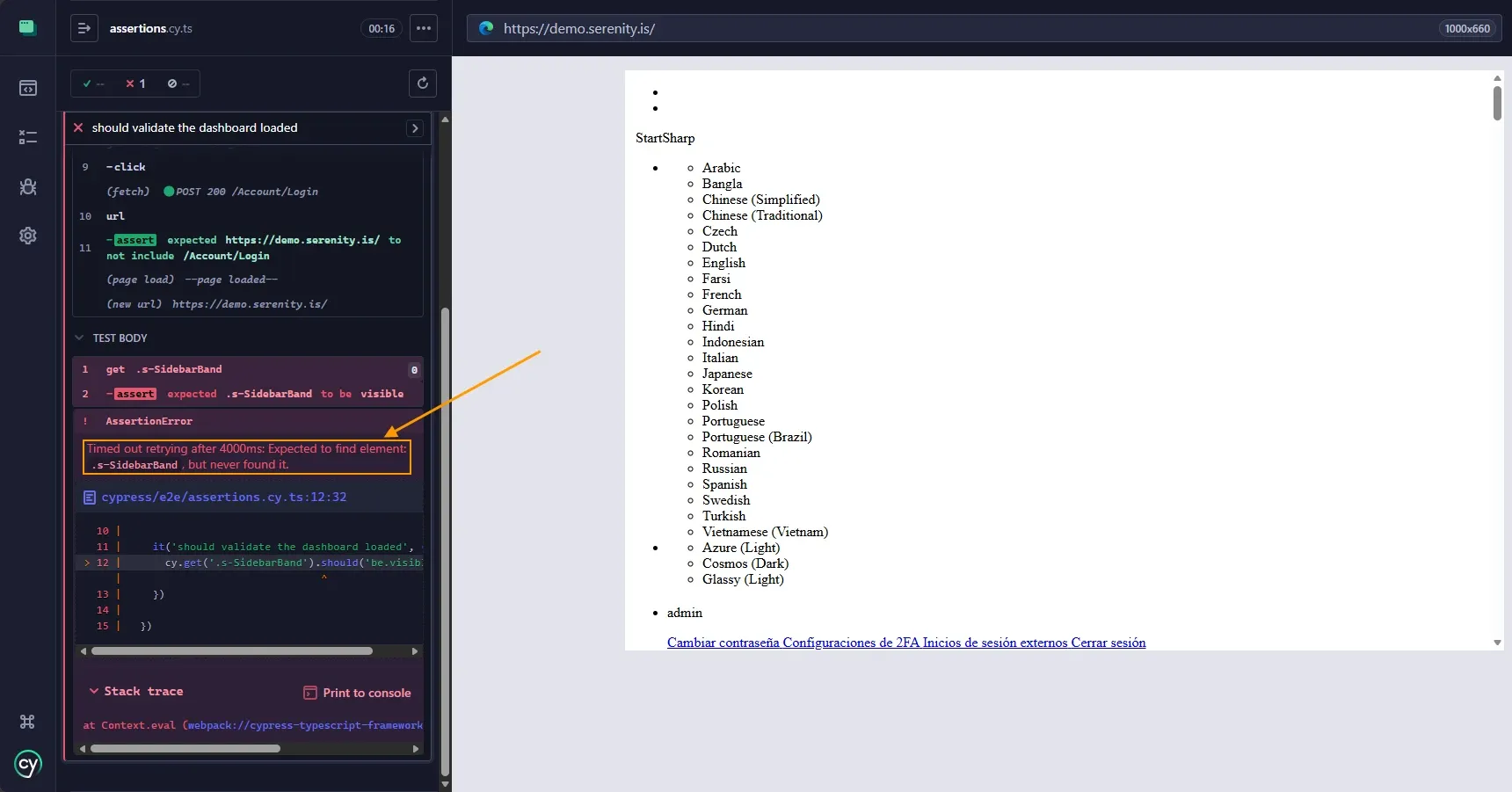
Cypress reintentó durante 4 segundos buscando .s-SidebarBand. No existe.
Timed out retrying after 4000ms: Expected to find element: .s-SidebarBand, but never found it.
El selector .s-SidebarBand no existe en el dashboard de Serenity.is. Lo inventé basándome en lo que creía que sería la clase del sidebar. Abrí DevTools y busqué los selectores reales:
h1con texto "Tablero" — el título del dashboard#s_sidebar_menu1— el menú lateral.s-sidebar-link— los links dentro del menú.s-sidebar-group-title— títulos de sección como "StartSharp"
Esto también demuestra retry-ability: Cypress no falló inmediatamente. Reintentó cy.get('.s-SidebarBand') durante 4 segundos antes de darse por vencido. Si el elemento hubiera aparecido en el segundo 3, el test habría pasado. Sin configuración, sin WebDriverWait.
Variantes de should()
Con los selectores correctos, armé los tests. Estas son las variantes que usé:
have.text — texto exacto:
cy.get('h1').should('have.text', 'Tablero')
Verifica que el texto sea exactamente "Tablero". Si fuera "Tablero " (con espacio extra) o "Tablero de control", falla.
be.visible — visibilidad:
cy.get('#s_sidebar_menu1').should('be.visible')
El elemento existe Y está visible en pantalla. No alcanza con que esté en el DOM — tiene que verse.
have.length.greaterThan — cantidad de elementos:
cy.get('#s_sidebar_menu1 li').should('have.length.greaterThan', 0)
Verifica que el menú tenga al menos un item. No me importa cuántos, solo que no esté vacío.
contain — texto parcial:
cy.get('h1').should('contain', 'Table')
A diferencia de have.text, contain busca texto parcial. "Tablero" contiene "Table", así que pasa.
have.attr — atributos:
cy.get('.s-sidebar-link').first().should('have.attr', 'href')
Verifica que el primer link del sidebar tenga un atributo href. No valido el valor, solo que exista.
be.enabled — habilitado:
cy.get('#LoginPanel0_Username').should('be.enabled')
Ya lo expliqué arriba — espera a que el input esté habilitado antes de continuar.
match — expresión regular:
cy.contains('Open Orders').parent().find('h3').invoke('text').should('match', /\d+/)
Busco el card de "Open Orders", subo al padre, busco el h3 (que tiene el número), extraigo el texto y valido que contenga al menos un dígito. Esto verifica que el dashboard carga con datos reales, no vacío.
Todas estas assertions hacen retry automático. Si el elemento no está listo, Cypress espera. Si pasan 4 segundos sin cumplirse, falla. Ese es el default — se puede cambiar en cypress.config.ts.
expect() — assertions explícitas
should() se encadena directo al comando. Pero a veces necesitás extraer un valor y hacer algo con él. Para eso existe expect():
it('should validate the title using expect()', () => {
    cy.get('h1').then(($h1) => {
        expect($h1.text()).to.equal('Tablero')
        expect($h1).to.be.visible
    })
})
.then() te da el elemento. Adentro usás expect() con la sintaxis to.equal, to.be.visible.
¿Cuándo usar expect() en vez de should()?
Cuando necesitás hacer múltiples validaciones sobre el mismo elemento, o cuando necesitás guardar un valor para comparar después. En la práctica, should() cubre el 90% de los casos. expect() es para los otros.
La diferencia con Selenium es que en TestNG todo es Assert.assertEquals(), Assert.assertTrue(). No hay dos formas. En Playwright es expect(locator).toBeVisible() siempre — una sola sintaxis. Cypress tiene dos, y está bien saber cuándo usar cada una.
Assertions negativas
Tan importante como verificar qué está, es verificar qué no está:
it('should not show the login panel after login', () => {
    cy.get('#LoginPanel').should('not.exist')
})

it('should not display error messages on dashboard', () => {
    cy.get('.error-message').should('not.exist')
})
not.exist verifica que el elemento no esté en el DOM. not.be.visible verifica que exista pero no se vea. La diferencia importa: después del login, el panel de login no debería estar en el DOM, no solo oculto.
También funciona con texto:
cy.get('h1').should('not.contain', 'Login')
En Selenium sería algo como Assert.assertFalse(driver.findElements(By.id("LoginPanel")).size() > 0). Más largo, menos legible.
Organización: describe() y context()
Hasta acá tenía todos los tests en un solo bloque describe. Con 10 tests, eso se vuelve difícil de leer. Cypress tiene context() para agrupar:
describe('Serenity.is Dashboard — Assertions y Hooks', () => {

  beforeEach(() => { /* login */ })

  context('page structure', () => {
    it('should validate the dashboard title', () => { ... })
    it('should validate the sidebar is visible', () => { ... })
    it('should validate sidebar has menu items', () => { ... })
  })

  context('dashboard cards', () => {
    it('should display all four stat cards', () => { ... })
    it('should validate card values are numbers', () => { ... })
  })

  context('negative assertions', () => {
    it('should not show the login panel after login', () => { ... })
    it('should not display error messages on dashboard', () => { ... })
  })

  context('explicit assertions with expect()', () => {
    it('should validate the title using expect()', () => { ... })
    it('should validate sidebar link attributes', () => { ... })
    it('should validate partial text with contain', () => { ... })
  })

})
describe() y context() son técnicamente iguales — hacen lo mismo. La convención es:
describe→ qué estoy testeando ("Serenity.is Dashboard")context→ bajo qué condiciones o agrupación ("page structure", "negative assertions")
En el Test Runner de Cypress se ven como bloques anidados. Hace más fácil saber qué falló y dónde.
En TestNG de Selenium usaba @Test(groups = {"smoke", "regression"}) para agrupar. En Playwright usaba test.describe() anidados. El concepto es organizar. La sintaxis varía.
Viewport
El viewport default de Cypress es 1000×660. El dashboard de Serenity.is quedaba apretado y con CSS roto. Agregué en cypress.config.ts:
export default defineConfig({
  e2e: {
    baseUrl: 'https://demo.serenity.is',
    viewportWidth: 1280,
    viewportHeight: 720,
  },
})
1280×720 es resolución estándar desktop. El dashboard se ve completo.
Comparación rápida de assertions
| Concepto | Cypress | Selenium (TestNG) | Playwright |
|---|---|---|---|
| Texto exacto | should('have.text', 'X') |
Assert.assertEquals(el.getText(), "X") |
expect(loc).toHaveText('X') |
| Visibilidad | should('be.visible') |
Assert.assertTrue(el.isDisplayed()) |
expect(loc).toBeVisible() |
| No existe | should('not.exist') |
Assert.assertEquals(els.size(), 0) |
expect(loc).not.toBeVisible() |
| Texto parcial | should('contain', 'X') |
Assert.assertTrue(el.getText().contains("X")) |
expect(loc).toContainText('X') |
| Retry automático | Sí (4s default) | No | Sí (5s default) |
| Setup por test | beforeEach() |
@BeforeMethod |
test.beforeEach() |
Selenium no reintenta assertions. Si el elemento no está listo cuando Assert.assertEquals se ejecuta, falla inmediatamente. En Cypress y Playwright el retry es automático.
Estado actual
10 tests pasando:
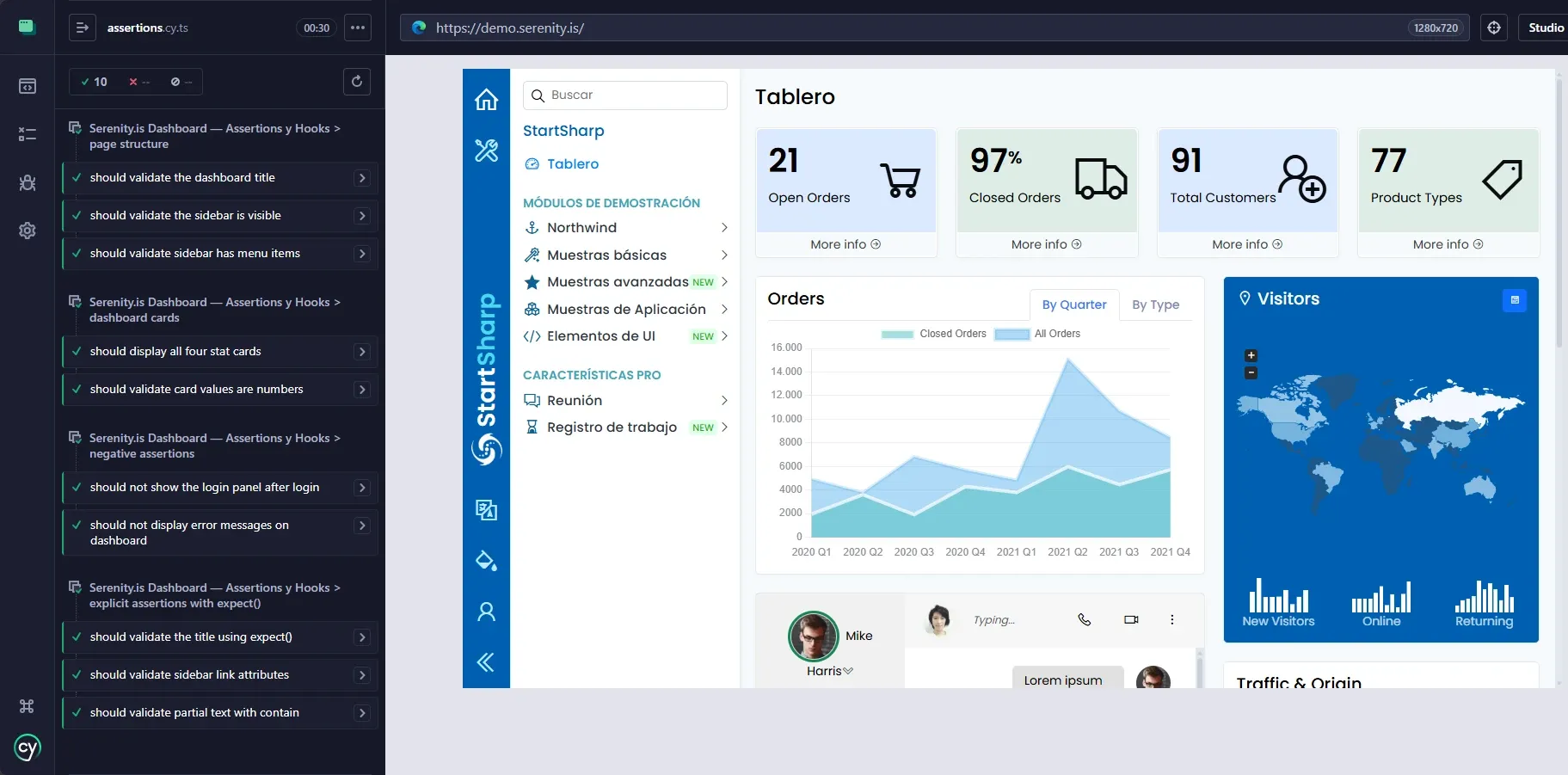
Los 4 context blocks agrupando tests por función: estructura, cards, negativas y explícitas
El código completo:
describe('Serenity.is Dashboard — Assertions y Hooks', () => {

  beforeEach(() => {
    cy.visit('/Account/Login')
    cy.get('#LoginPanel0_Username').should('be.enabled').clear().type('admin')
    cy.get('#LoginPanel0_Password').should('be.enabled').clear().type('serenity')
    cy.get('#LoginPanel0_LoginButton').click()
    cy.url().should('not.include', '/Account/Login')
  })

  context('page structure', () => {

    it('should validate the dashboard title', () => {
      cy.get('h1').should('have.text', 'Tablero')
    })

    it('should validate the sidebar is visible', () => {
      cy.get('#s_sidebar_menu1').should('be.visible')
    })

    it('should validate sidebar has menu items', () => {
      cy.get('#s_sidebar_menu1 li').should('have.length.greaterThan', 0)
    })

  })

  context('dashboard cards', () => {

    it('should display all four stat cards', () => {
      cy.contains('Open Orders').should('be.visible')
      cy.contains('Closed Orders').should('be.visible')
      cy.contains('Total Customers').should('be.visible')
      cy.contains('Product Types').should('be.visible')
    })

    it('should validate card values are numbers', () => {
      cy.contains('Open Orders').parent().find('h3').invoke('text').should('match', /\d+/)
    })

  })

  context('negative assertions', () => {

    it('should not show the login panel after login', () => {
      cy.get('#LoginPanel').should('not.exist')
    })

    it('should not display error messages on dashboard', () => {
      cy.get('.error-message').should('not.exist')
    })

  })

  context('explicit assertions with expect()', () => {

    it('should validate the title using expect()', () => {
      cy.get('h1').then(($h1) => {
        expect($h1.text()).to.equal('Tablero')
        expect($h1).to.be.visible
      })
    })

    it('should validate sidebar link attributes', () => {
      cy.get('.s-sidebar-link').first().should('have.attr', 'href')
      cy.contains('Northwind').should('be.visible')
    })

    it('should validate partial text with contain', () => {
      cy.get('h1').should('contain', 'Table')
      cy.get('h1').should('not.contain', 'Login')
    })

  })

})
Próximo post: Configuración profesional del proyecto. cypress.config.ts a fondo, archivos support, fixtures, organización de specs por módulo y .gitignore específico para Cypress.