Retrieve y Update en Postman: completando el CRUD
Obtengo los datos de un cliente con Retrieve, modifico un campo con Update y verifico el cambio. Ciclo CRUD completo sobre la misma entidad.
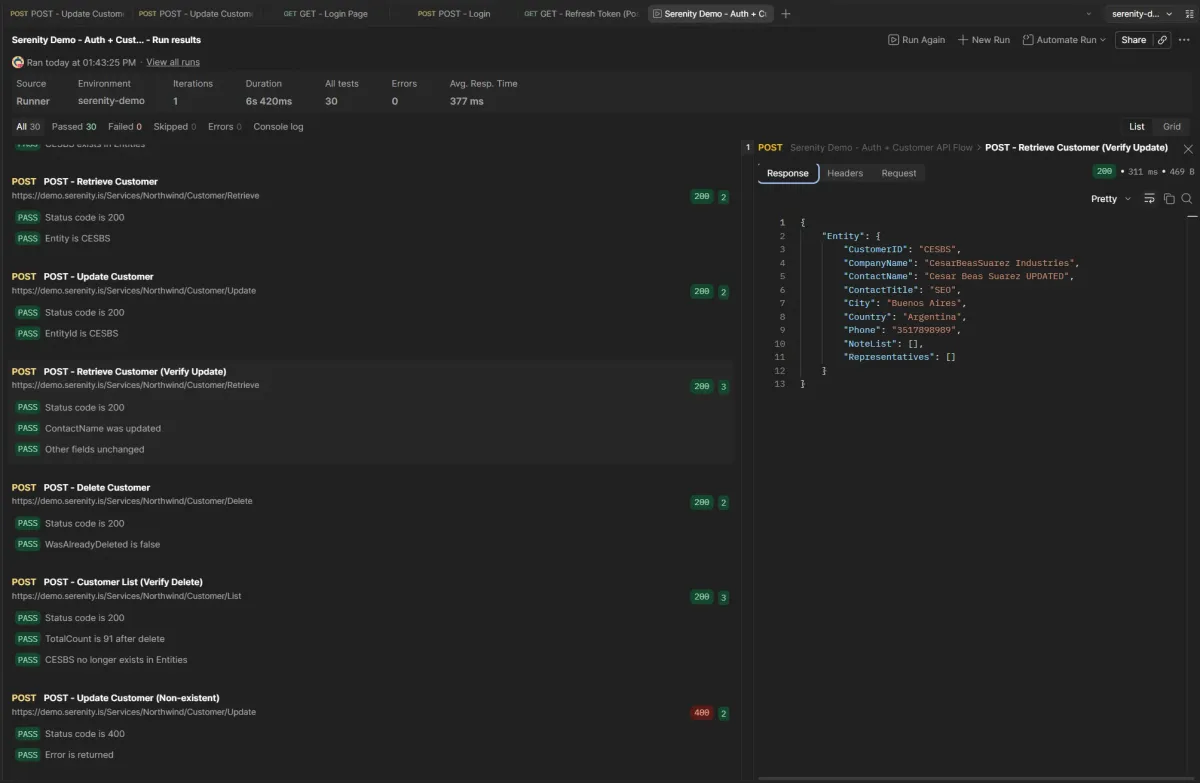
El post anterior cubrió Create y Delete: crear un cliente, verificar, eliminarlo, confirmar. Faltaba la U del CRUD. Este post la completa.
El flujo es: Retrieve para obtener los datos actuales → Update para modificarlos → Retrieve de nuevo para verificar que el cambio se aplicó. Todo sobre CESBS, el mismo cliente que creo y elimino en cada corrida.
Investigación con DevTools
Misma técnica que en los posts anteriores: abrir DevTools, Network, Fetch/XHR, y operar desde la UI de Serenity observando qué requests salen.
Retrieve: obtener un cliente
Abrí el cliente ALFKI desde la grilla de Clientes.
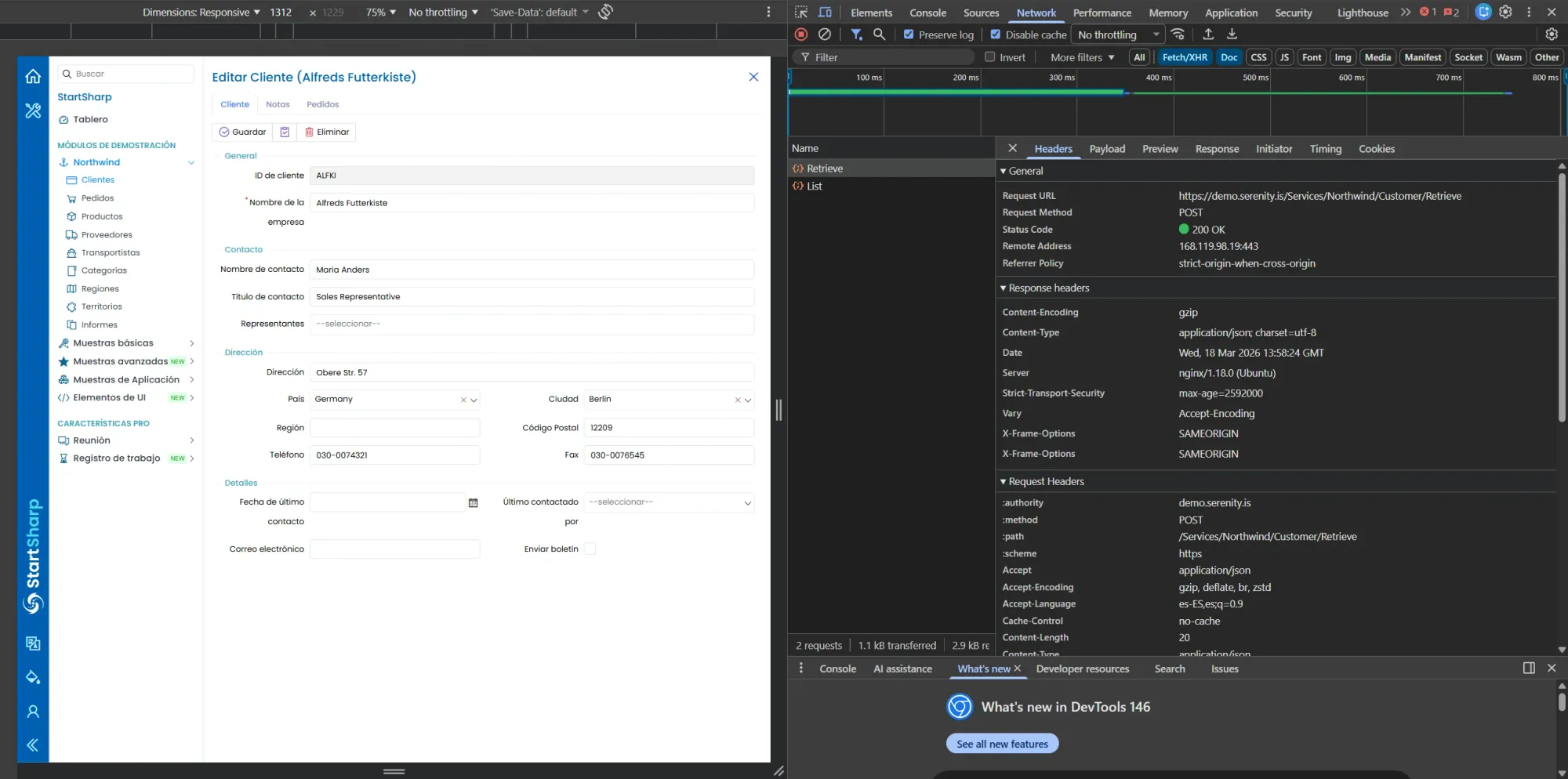
Al abrir un cliente, Serenity llama a /Customer/Retrieve. POST, 200 OK.
Endpoint: POST /Services/Northwind/Customer/Retrieve Status: 200 OK
La Response:
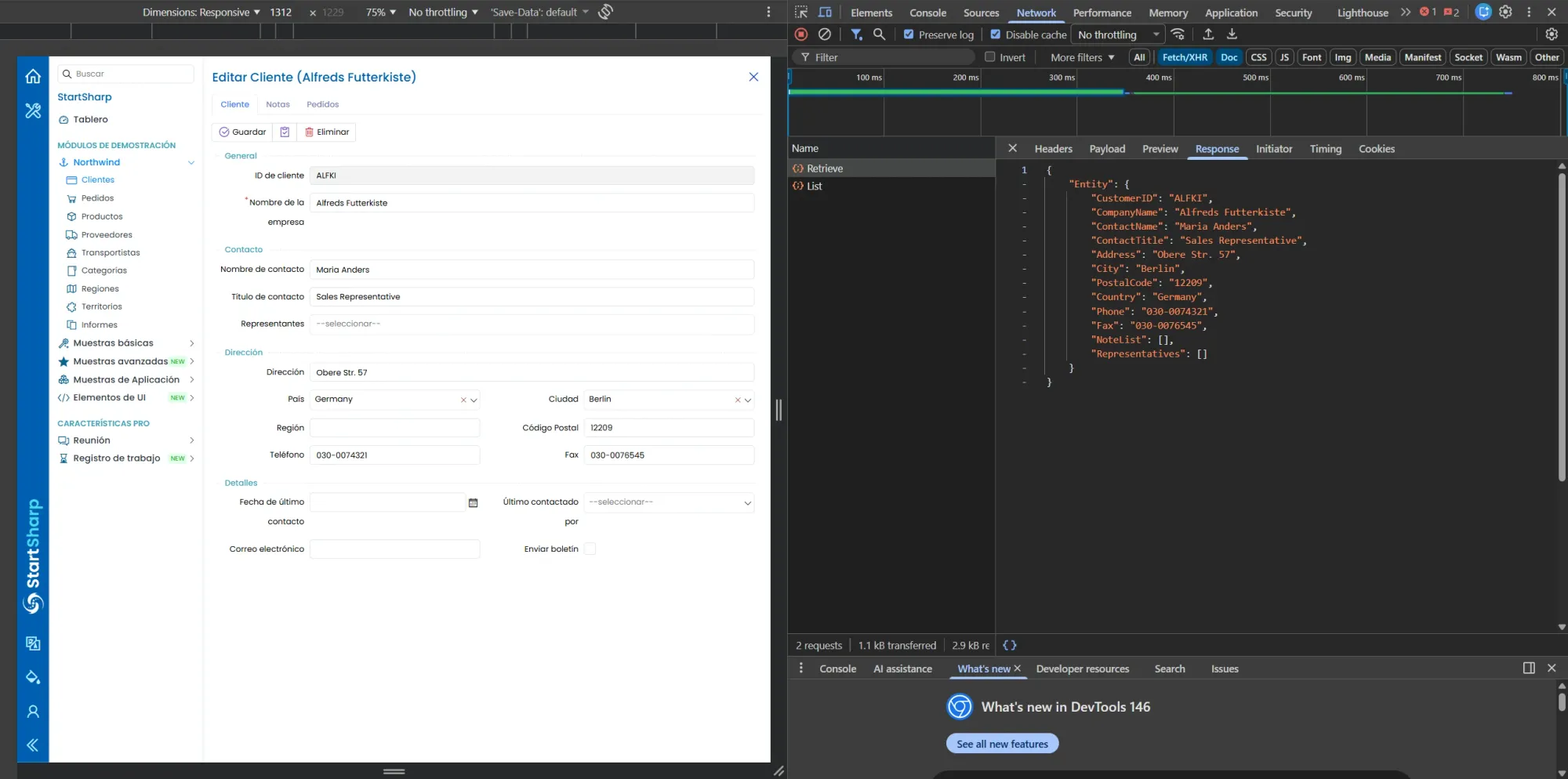
Retrieve devuelve el objeto Entity completo con todos los campos del cliente.
{
  "Entity": {
    "CustomerID": "ALFKI",
    "CompanyName": "Alfreds Futterkiste",
    "ContactName": "Maria Anders",
    "ContactTitle": "Sales Representative",
    "Address": "Obere Str. 57",
    "City": "Berlin",
    "Country": "Germany",
    "PostalCode": "12209",
    "Phone": "030-0074321",
    "Fax": "030-0076545",
    "NoteList": [],
    "Representatives": []
  }
}
Mismo wrapper "Entity" que en Create y Customer List. La convención de Serenity es consistente.
En el post anterior mapeé el Retrieve pero no lo usé. Acá entra como request real: necesito los datos del cliente para saber qué tengo antes de modificar.
Update: modificar un cliente
Sin cerrar el formulario de ALFKI, cambié el ContactName a "cesar beas suarez" y le di Guardar.
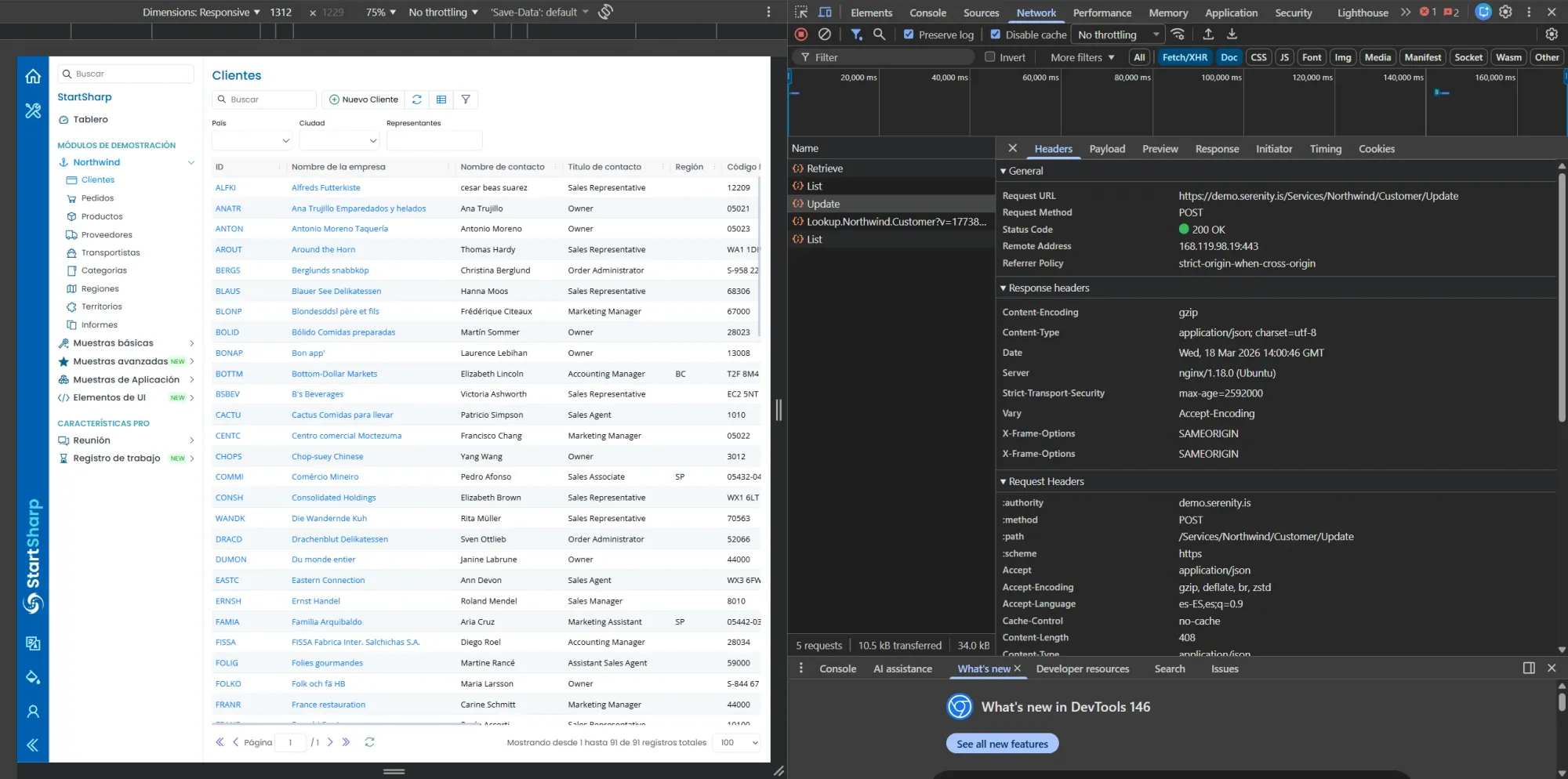
Update: POST /Services/Northwind/Customer/Update, 200 OK. Al guardar, Serenity dispara Update, un Lookup y un List.
Endpoint: POST /Services/Northwind/Customer/Update Status: 200 OK
El Payload:
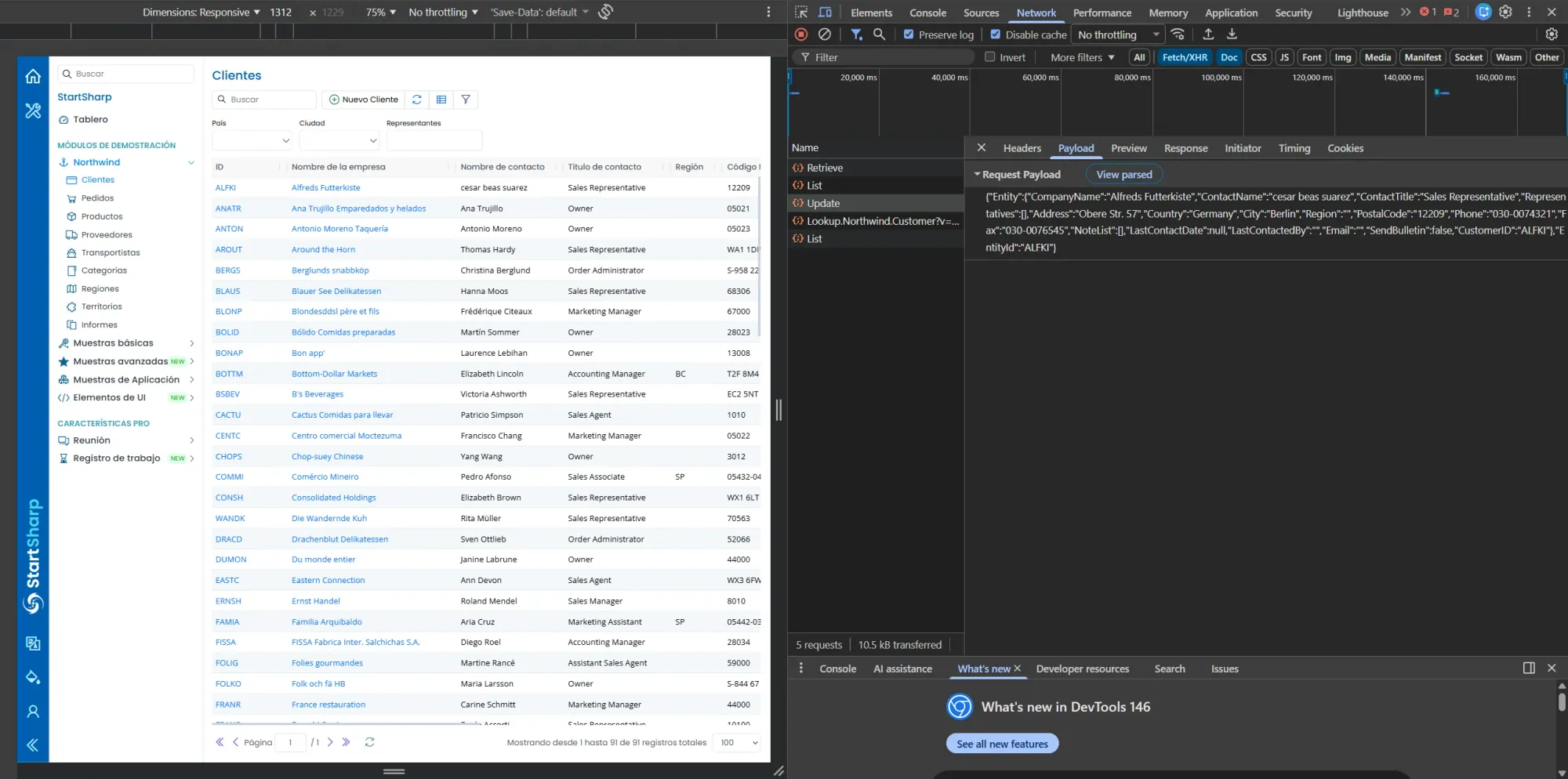
El payload del Update: manda TODOS los campos, no solo el modificado. Y tiene EntityId tanto dentro de Entity como afuera.
{
  "Entity": {
    "CompanyName": "Alfreds Futterkiste",
    "ContactName": "cesar beas suarez",
    "ContactTitle": "Sales Representative",
    "Representatives": [],
    "Address": "Obere Str. 57",
    "Country": "Germany",
    "City": "Berlin",
    "Region": "",
    "PostalCode": "12209",
    "Phone": "030-0074321",
    "Fax": "030-0076545",
    "NoteList": [],
    "LastContactDate": null,
    "LastContactedBy": "",
    "Email": "",
    "SendBulletin": false,
    "CustomerID": "ALFKI"
  },
  "EntityId": "ALFKI"
}
Dos cosas:
El browser manda todos los campos, no solo el modificado. Yo solo cambié ContactName, pero el payload incluye Address, Phone, Fax, todo. Serenity envía el objeto completo siempre.
EntityId aparece dos veces. Dentro de Entity como CustomerID y afuera como EntityId. En Create el payload solo tenía Entity. En Update tiene ambos. Es la forma que tiene Serenity de identificar qué registro modificar.
La Response:
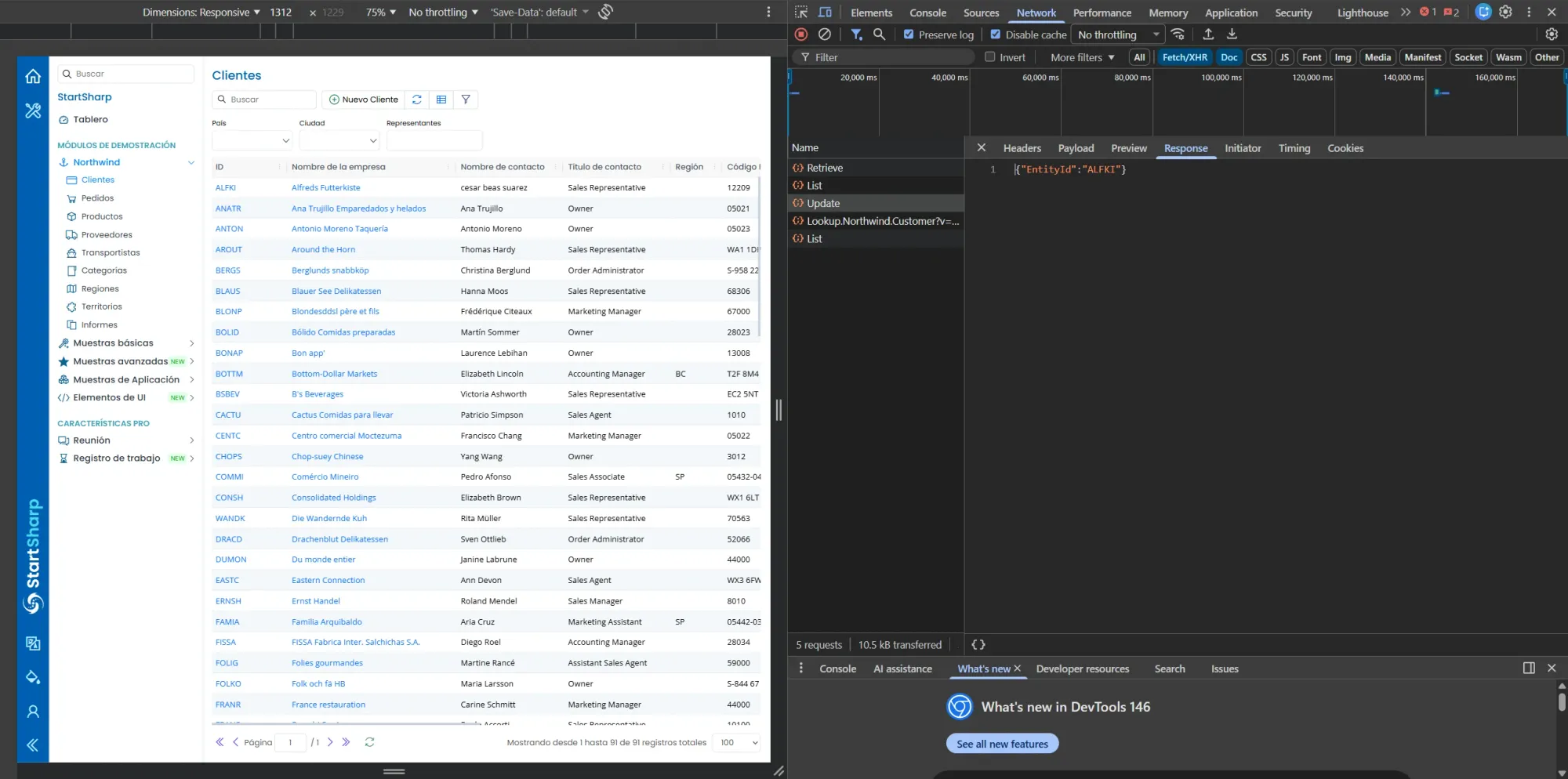
Response del Update: {"EntityId": "ALFKI"}. Mismo formato que Create.
{"EntityId": "ALFKI"}
Mismo formato que Create. Devuelve el ID del registro modificado.
Después del Update, Serenity disparó automáticamente un Lookup y un List (para refrescar la grilla). Esos requests no son parte del Update, los genera la UI.
Mapa de endpoints actualizado
| Operación | Endpoint | Método |
|---|---|---|
| Crear | /Services/Northwind/Customer/Create |
POST |
| Listar | /Services/Northwind/Customer/List |
POST |
| Obtener | /Services/Northwind/Customer/Retrieve |
POST |
| Modificar | /Services/Northwind/Customer/Update |
POST |
| Eliminar | /Services/Northwind/Customer/Delete |
POST |
El CRUD completo mapeado. Todo POST, la operación la define el endpoint.
Armando los requests en Postman
Body mínimo del Update
El browser mandó todos los campos. Probé con los mínimos, igual que hice con Create:
{
  "Entity": {
    "CustomerID": "CESBS",
    "CompanyName": "CesarBeasSuarez Industries",
    "ContactName": "Cesar Beas Suarez UPDATED",
    "ContactTitle": "SEO",
    "Country": "Argentina",
    "City": "Buenos Aires",
    "Phone": "3517898989"
  },
  "EntityId": "CESBS"
}
Funcionó. El servidor aceptó el Update con 200. No necesité mandar campos vacíos.
Dónde van los requests nuevos
Los requests de Retrieve y Update tienen que ir entre Create y Delete. Si los ponés después del Delete, CESBS ya no existe y todo falla con EntityNotFound. Esto me pasó en la primera corrida del Runner y tuve que reordenar.
La colección quedó así:
GET  - Login Page
POST - Login
GET  - Refresh Token (Post-Login)
POST - Login (user correcto, pass mal)
POST - Login (user mal, pass correcta)
POST - Login (user y pass incorrectos)
POST - Login (user y pass vacíos)
POST - Customer List
POST - Create Customer
POST - Customer List (Verify Create)
POST - Retrieve Customer               ← NUEVO
POST - Update Customer                  ← NUEVO
POST - Retrieve Customer (Verify Update) ← NUEVO
POST - Delete Customer
POST - Customer List (Verify Delete)
POST - Update Customer (Non-existent)   ← NUEVO (negativo)
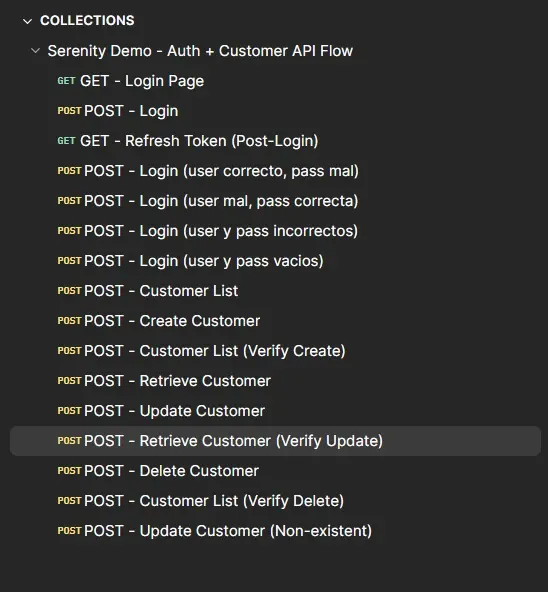
La colección completa: 16 requests. Retrieve y Update entre Verify Create y Delete.
Pre-request scripts: misma lógica
Todos los requests nuevos usan el mismo pre-request script de siempre:
const csrf = pm.environment.get("csrfToken");
if (csrf) {
    pm.request.headers.upsert({
        key: "x-csrf-token",
        value: csrf
    });
}
Nada nuevo acá.
Assertions
POST - Retrieve Customer
pm.test("Status code is 200", function () {
    pm.response.to.have.status(200);
});

pm.test("Entity is CESBS", function () {
    const jsonData = pm.response.json();
    pm.expect(jsonData.Entity.CustomerID).to.eql("CESBS");
    pm.expect(jsonData.Entity.ContactName).to.eql("Cesar Beas Suarez");
});
Valido que el Retrieve devuelva el cliente correcto con el ContactName original. Este es el estado "antes" del Update.
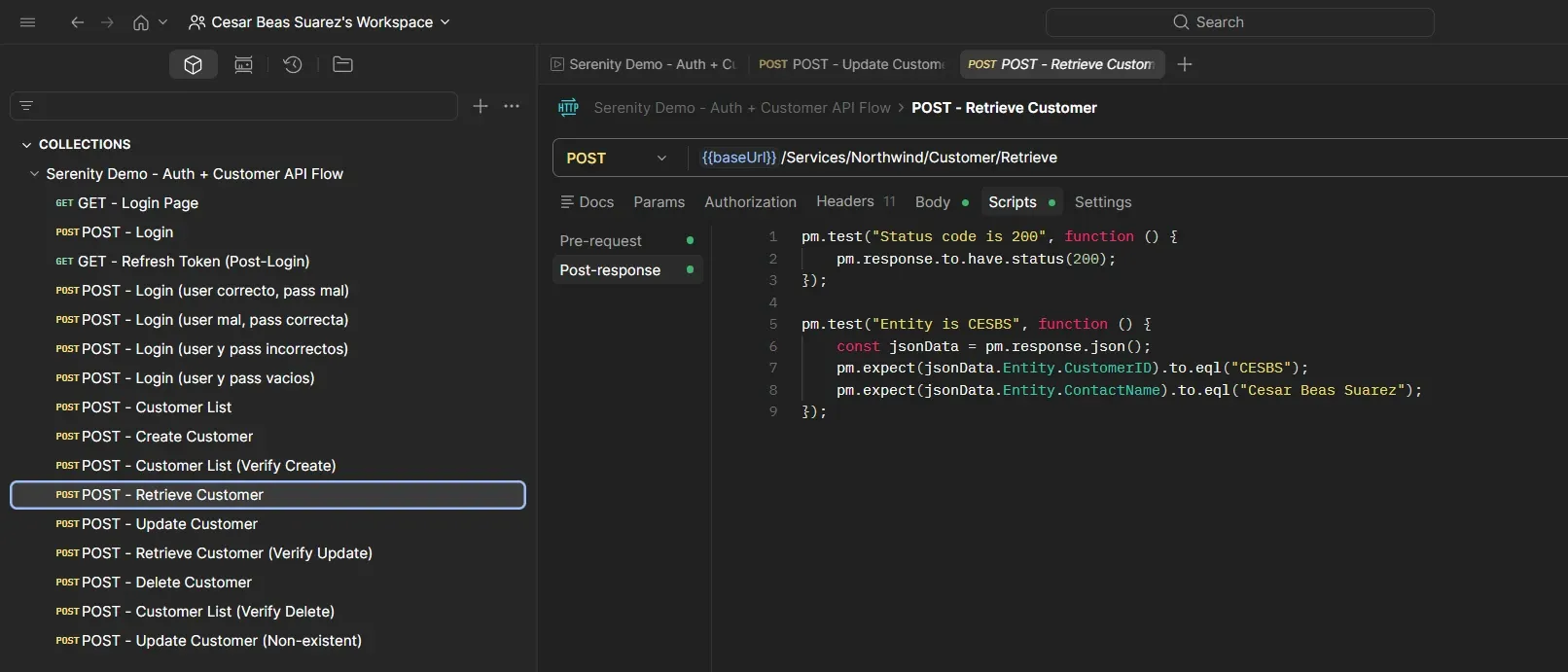
Retrieve Customer: 200, Entity con CustomerID CESBS y ContactName original.
POST - Update Customer
Body:
{
  "Entity": {
    "CustomerID": "CESBS",
    "CompanyName": "CesarBeasSuarez Industries",
    "ContactName": "Cesar Beas Suarez UPDATED",
    "ContactTitle": "SEO",
    "Country": "Argentina",
    "City": "Buenos Aires",
    "Phone": "3517898989"
  },
  "EntityId": "CESBS"
}
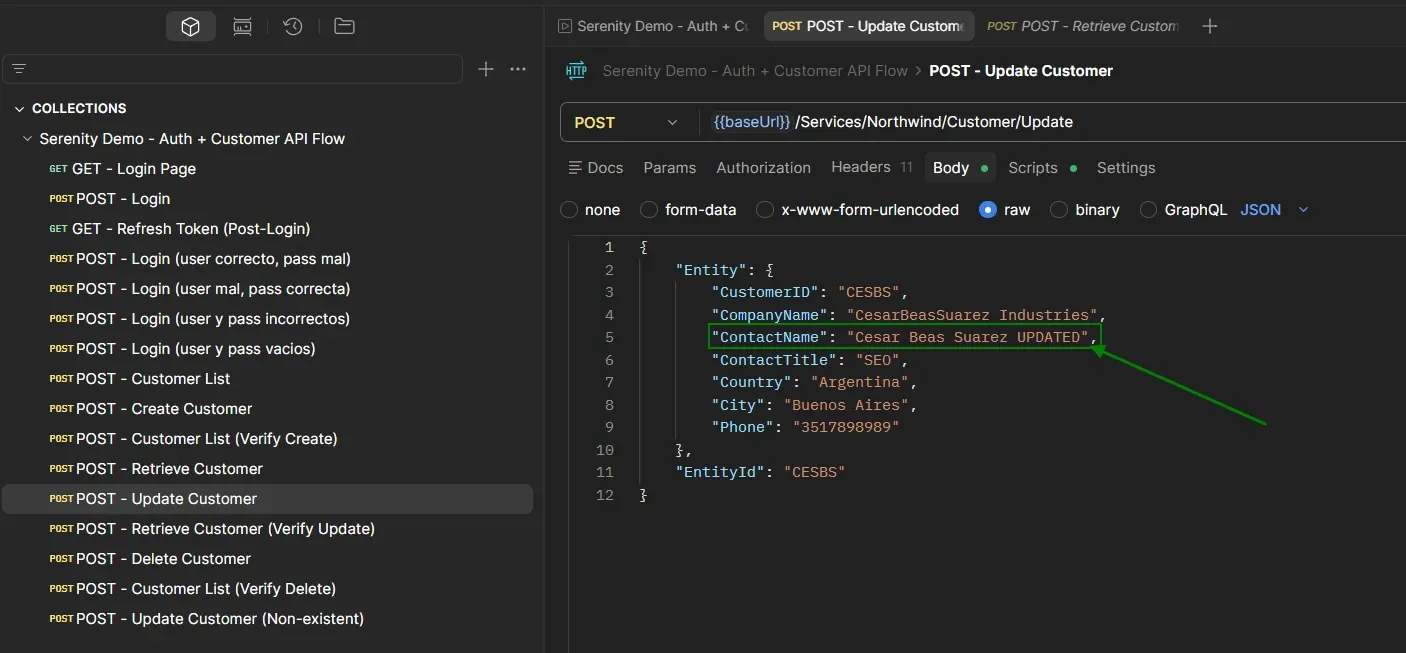
Post-response:
pm.test("Status code is 200", function () {
    pm.response.to.have.status(200);
});

pm.test("EntityId is CESBS", function () {
    const jsonData = pm.response.json();
    pm.expect(jsonData.EntityId).to.eql("CESBS");
});
El Update devuelve {"EntityId": "CESBS"}. Confirma que el registro fue modificado. Pero no dice qué cambió. Para eso necesito un segundo Retrieve.
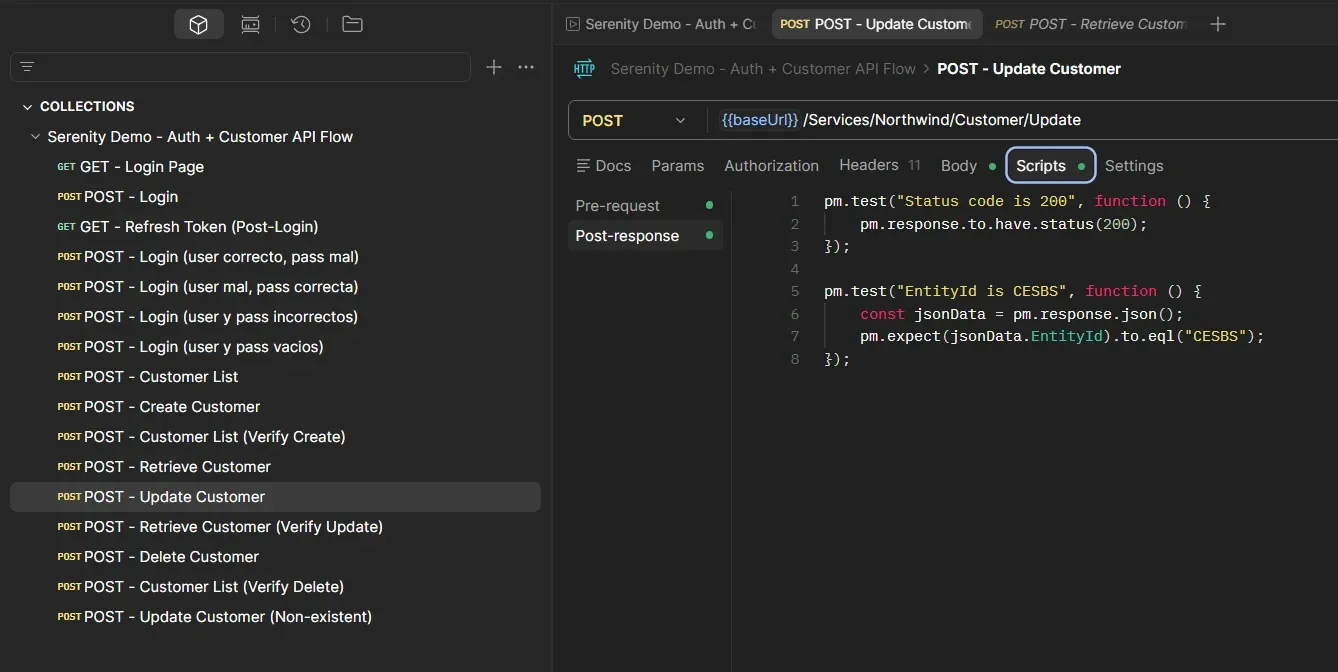
Update Customer: 200, EntityId CESBS. El servidor aceptó la modificación.
POST - Retrieve Customer (Verify Update)
Body: mismo que el primer Retrieve ({"EntityId": "CESBS"}).
Post-response:
pm.test("Status code is 200", function () {
    pm.response.to.have.status(200);
});

pm.test("ContactName was updated", function () {
    const jsonData = pm.response.json();
    pm.expect(jsonData.Entity.ContactName).to.eql("Cesar Beas Suarez UPDATED");
});

pm.test("Other fields unchanged", function () {
    const jsonData = pm.response.json();
    pm.expect(jsonData.Entity.CompanyName).to.eql("CesarBeasSuarez Industries");
    pm.expect(jsonData.Entity.CustomerID).to.eql("CESBS");
});
Acá valido dos cosas: que el campo modificado cambió y que los otros campos no se alteraron. Si el Update sobreescribiera todo el registro, CompanyName podría haber desaparecido. No fue el caso.
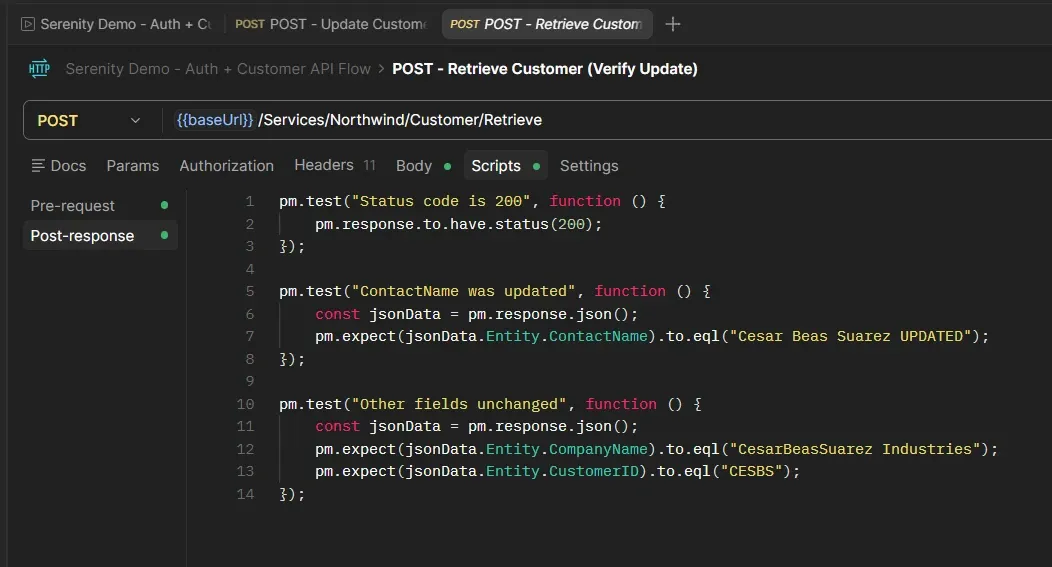
Retrieve Verify: ContactName cambió a "UPDATED", CompanyName sigue igual.
¿Qué pasa si...?
Update de un cliente que no existe
Mandé un Update con EntityId "XXXXX":
{
  "Entity": {
    "CustomerID": "XXXXX",
    "CompanyName": "No Existe",
    "ContactName": "Nadie"
  },
  "EntityId": "XXXXX"
}
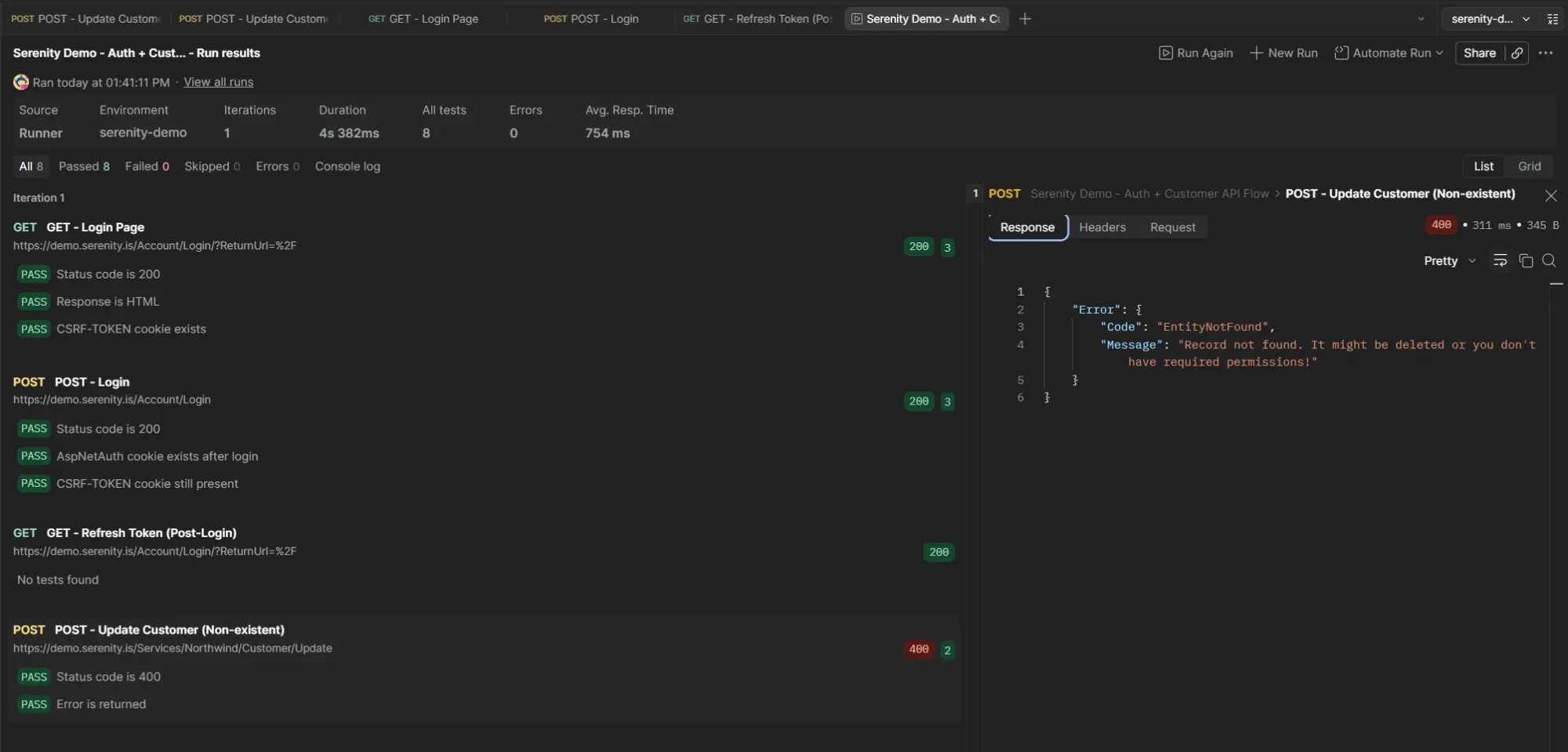
Update de registro inexistente: 400 con EntityNotFound. Mismo patrón que Delete.
Status: 400 Bad Request
{
  "Error": {
    "Code": "EntityNotFound",
    "Message": "Record not found. It might be deleted or you don't have required permissions!"
  }
}
Mismo error que el Delete de un registro inexistente. Exactamente el mismo Code, el mismo Message. Serenity usa el mismo patrón de error para cualquier operación sobre un registro que no existe.
Patrón de errores actualizado
| Operación | Status | Error Code | Mensaje |
|---|---|---|---|
| Login incorrecto | 400 | AuthenticationError | Invalid username or password! |
| Create duplicado | 400 | (sin Code) | Can't save record. Same Customer Id value! |
| Delete inexistente | 400 | EntityNotFound | Record not found. |
| Update inexistente | 400 | EntityNotFound | Record not found. |
Delete y Update comparten el mismo error para registros inexistentes. Consistente.
El flujo completo: 30/30
Limpié el cookie jar, corrí el Runner.
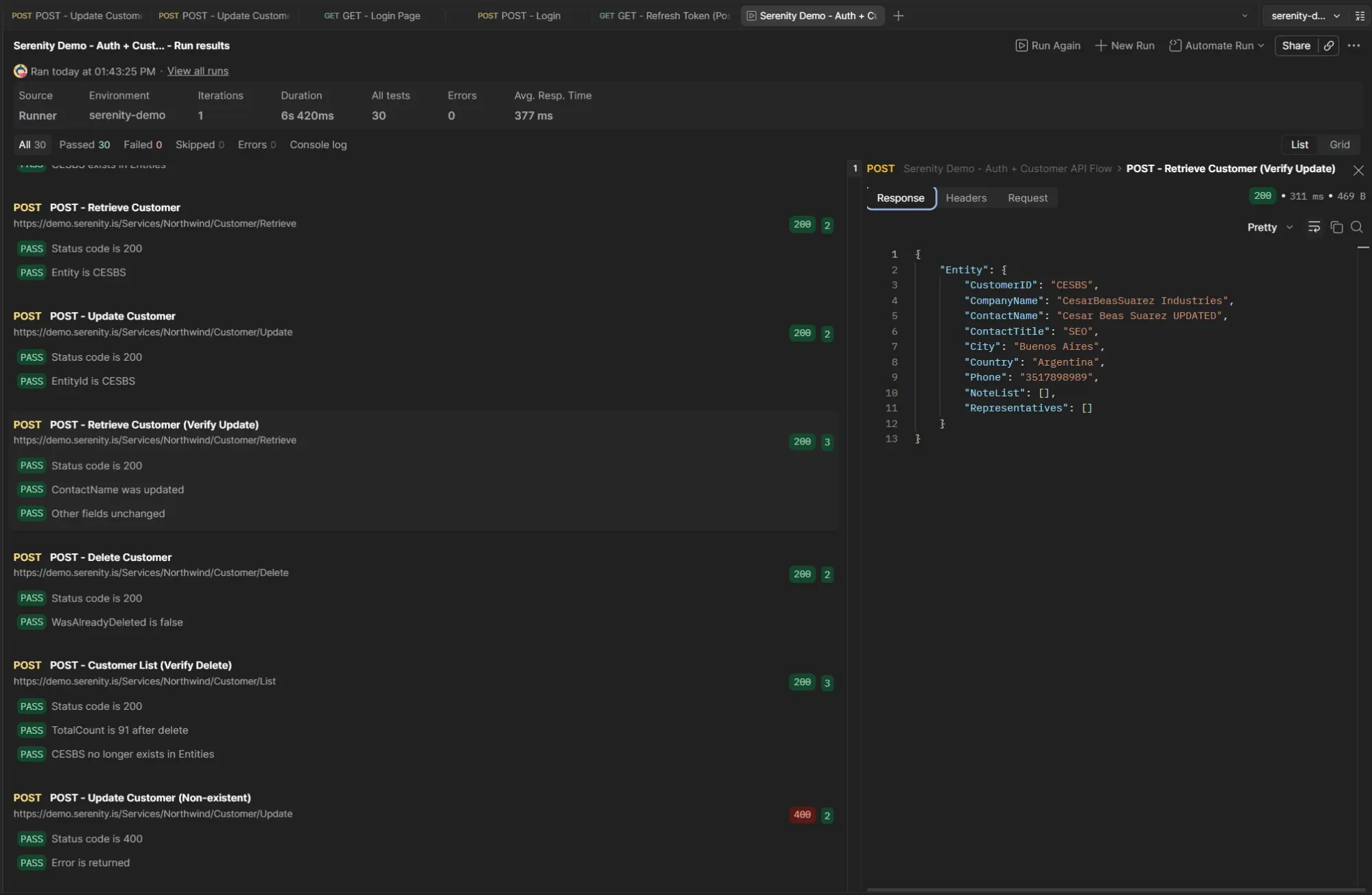
30 assertions, todas verdes. El ciclo CRUD completo funciona.
All 30 Passed 30 Failed 0 Skipped 0
El ciclo completo sobre CESBS:
- Login + Refresh Token → autenticación
- Customer List → baseline: 91 registros
- Create Customer → 200, EntityId: CESBS
- Customer List (Verify Create) → 92 registros, CESBS existe
- Retrieve Customer → 200, Entity con datos originales
- Update Customer → 200, EntityId: CESBS
- Retrieve Customer (Verify Update) → ContactName UPDATED, otros campos sin cambios
- Delete Customer → 200, WasAlreadyDeleted: false
- Customer List (Verify Delete) → 91 registros, CESBS no existe
- Update Customer (Non-existent) → 400, EntityNotFound
La colección sigue siendo self-cleaning. Create al principio, Delete al final. El Update no rompe eso porque modifica un registro que después se elimina igual.
Takeaways
Retrieve como paso previo al Update. No es solo para verificar después. Es útil antes: te muestra el estado actual del registro, confirmás que existe, y tenés un baseline contra el cual comparar después del Update.
El browser manda todo, el servidor acepta mínimos. El payload del Update desde la UI incluía todos los campos. Desde Postman mandé solo los necesarios y funcionó. Mismo hallazgo que con Create.
EntityId duplicado en el Update. A diferencia de Create (que solo tiene Entity), Update necesita EntityId también a nivel raíz. Es la convención de Serenity para identificar qué registro modificar. Algo a tener en cuenta si estás armando requests sin copiar del browser.
El orden importa. Mi primera corrida falló porque los requests de Retrieve y Update estaban después del Delete. CESBS ya no existía. Reordené y todo pasó. En una colección secuencial, el orden de los requests es parte del diseño del test.
Estado actual
La colección tiene 16 requests y 30 assertions que pasan en una corrida limpia. Cubre:
- Autenticación (login + CSRF token refresh)
- Testing negativo del login (4 escenarios)
- Consulta de grilla (Customer List con validación de estructura)
- CRUD completo: Create, Retrieve, Update, Delete con verificaciones
- Escenarios negativos: create duplicado, delete inexistente, update inexistente
- La colección es self-cleaning
Lo que sigue: validación contra datos externos
Con el CRUD completo, el siguiente paso es comparar los datos de la grilla contra una fuente externa. Exportar los clientes esperados a un archivo (Excel o CSV) y validar desde Postman que lo que devuelve la API coincide con lo esperado.